
Start from your workflow
Use your selected template and session details, with relevant patient context where available.
Treatment note automation
Draft appointment-linked treatment notes with AI, then review, edit and save them in your clinic workflow.
Start with your note template, today’s findings and relevant patient context. Generate a draft inside the patient record, make it accurate for the consultation, then Confirm & Save to the selected session.
No credit card required. AI and SMS usage credits cost extra after the trial.
Illustrative preview · Demo data
Patient reports improved comfort since the previous visit.
Add the findings you assessed in this consultation.
Review the draft against your clinical judgement.
Confirm the agreed treatment and follow-up plan.
Illustrative note preview. AI output is a draft and requires practitioner review.
Made for everyday clinic work
Use your selected template and session details, with relevant patient context where available.
Read every answer, correct omissions and edit the draft before it becomes a saved clinical note.
Save the reviewed note to the patient’s selected appointment rather than copying it between separate tools.
How it works
Open Treatment notes for the patient and select the appointment you are documenting.
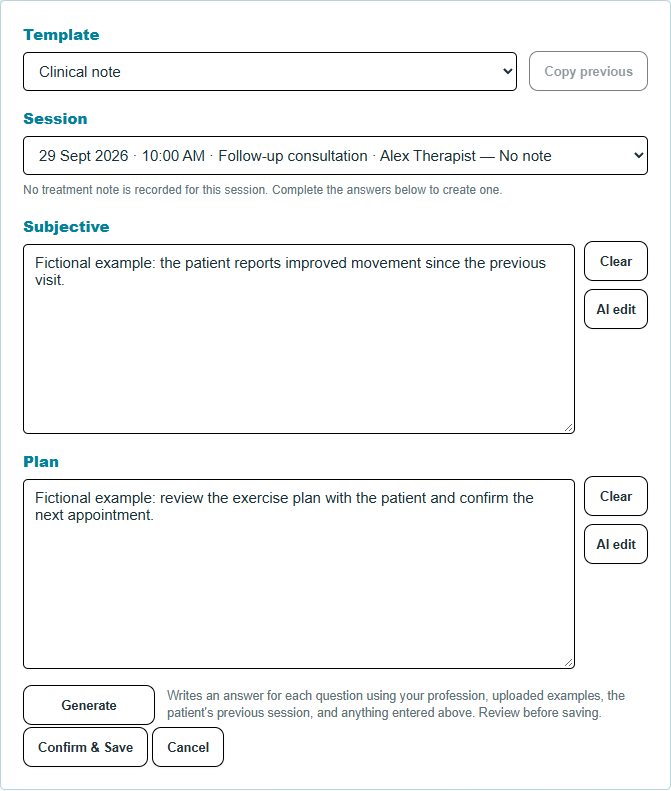
Enter today’s consultation details in the template, then generate a draft using available context.
Check the draft for accuracy. Select Confirm & Save when the note reflects your consultation.
AI assists with drafting. It does not independently diagnose, approve records or replace clinical judgement. AI usage consumes credits.
Inside the workspace
Work through the selected session, editable fields and review controls in one place.
A few practical questions
You review and edit the generated content, then use the save controls in the clinical workflow. The practitioner remains responsible for the final record.
Drafting uses the selected treatment-note template and the information you enter. Review the structure and answers before using the result.
The original 30-day trial includes 1,000 AI credits once. Unused free credits expire at trial end. Paid AI usage consumes separately purchased credits; see current pricing.
Try it in your own workflow
Explore bookings, notes, billing and patient communication in your own workspace.
No card required. See pricing for trial allowances and usage costs.